Friday, May 19, 2023

The Importance of Information Literacy in Today's Digital Age

In today's digital age, information is readily available at our fingertips. While this can be incredibly empowering, it also poses a significant challenge: how can we sift through the sheer volume of information available to us and determine what is trustworthy, accurate, and relevant? This is where information literacy comes in. Information literacy is the ability to identify, evaluate, and use information effectively and responsibly. In other words, it's the foundation of IS101.

The impact of information literacy is felt not only on an individual level, but also on a societal level. For individuals, it can mean the difference between making informed decisions and falling victim to misinformation or propaganda. In a world where misinformation spreads like wildfire, being able to evaluate sources and distinguish fact from fiction is crucial. As new technologies emerge and new information becomes available, the ability to learn, adapt, and grow is increasingly essential.

Navigating the vast sea of information available online can be overwhelming, but there are a few tips and tricks that can help. One important tip is to evaluate the source of the information. Is it reputable? Does it have a bias? Another tip is to fact-check information before sharing it. Taking the time to verify information can help prevent the spread of misinformation. A quick Google search can often reveal whether a claim is true or false. Finally, stay curious and continue to learn. Take advantage of opportunities to expand your knowledge and skills, whether it's through courses like IS101 or simply exploring topics that interest you.

It's important to reflect on how we will apply the concepts and skills we've learned beyond the course. Whether in our personal or professional lives, the ability to identify, evaluate, and use information effectively and responsibly is crucial for success. By cultivating our information literacy skills, we can become more informed, engaged, and empowered members of our communities. :)

Thursday, May 18, 2023

Reflecting on My IS 101 Journey: A Final Farewell

As the semester draws to a close, it's time for me to bid farewell to the class. This course has been a transformative experience, filled with valuable lessons, personal growth, and newfound knowledge. Today, I would like to share my reflections on what I have learned, the skills and experiences I developed, and extend my best wishes to each and every one of you as we embark on our future endeavors.

Throughout this journey, I have developed numerous skills that I am confident will serve me well in the future. The technical knowledge we gained about information systems, databases, networks, and software development has laid a solid foundation for further learning and specialization. I now feel equipped to navigate the rapidly evolving technological landscape with confidence and adaptability.

However, it wasn't just the technical skills that I gained. Our threaded discussions and tedious assignments have shaped my communication, teamwork, and problem-solving abilities. The real-world scenarios/assignments we tackled together required us to think critically and find innovative solutions, mirroring the challenges we will face in our future careers. These skills are parallel; they transcend the boundaries of the digital realm and will undoubtedly benefit us in any path we choose to follow.

Now, as we part ways and embark on different paths, I want to extend my heartfelt wishes to each of you. May you find success and fulfillment in whatever field you choose, utilizing the knowledge and skills we have acquired together. Remember, success is not solely measured by the grades we receive but by the knowledge we acquire, the growth we experience, and the impact we make. Embrace challenges, stay curious, and never stop learning!

Finally, I would like to express my deepest gratitude to our instructor, Mr. Wu. Your guidance, patience, and understanding throughout this semester have made a significant impact on our learning experience. Your dedication to our growth and unwavering support have been truly inspiring. Thank you for creating an environment where we felt comfortable asking questions, sharing ideas, and challenging ourselves. Your passion for IS 101 has ignited a similar passion within each of us, and for that, we are immensely grateful.

As I conclude this final blog post for our class, I am filled with a sense of accomplishment, gratitude, and excitement for what lies ahead. There is no doubt that the skills and experiences we have gained will serve as a solid foundation for our future endeavors.

Best of luck to all my classmates, and may the winds of success carry you to extraordinary heights.

Not a goodbye, but a see-ya-later! I am sure we'll cross paths one day. :)


With kind regards,

Jimena Cabral

Monday, May 15, 2023

Digital Ink

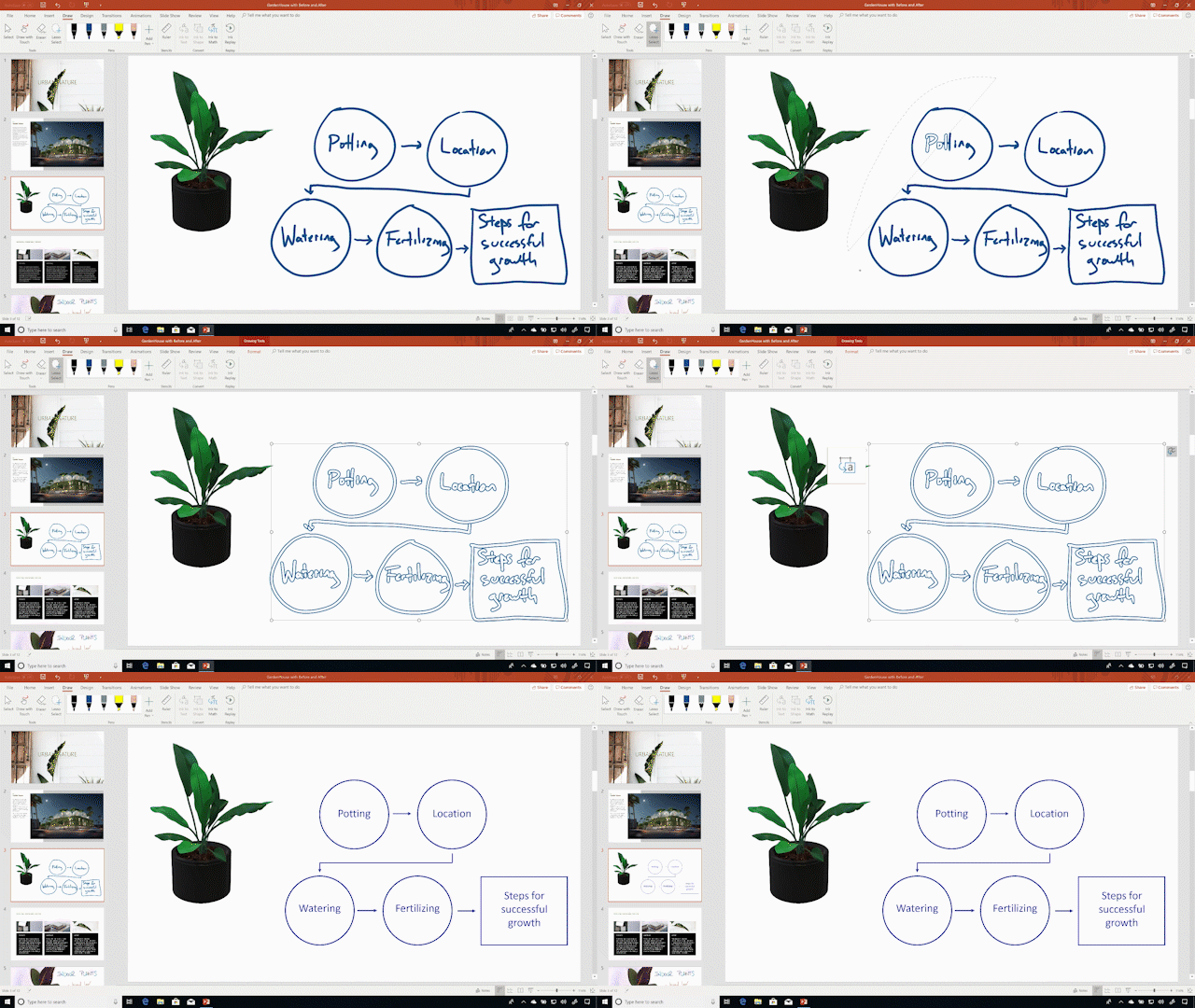
PowerPoint's digital ink features are a game-changer for anyone looking to create dynamic and engaging presentations. With this feature, users can use a stylus or their fingers to annotate their slides in real-time. This makes it easy to highlight important points, draw attention to specific elements, and create custom illustrations on the fly. By allowing presenters to add their own personal touch to their presentations, digital ink can help to make presentations more engaging and memorable for all types of audience.

Another benefit of digital ink is that it can make presentations more inclusive and accessible. For example, presenters can use digital ink to write out complex equations or diagrams, making it easier for their audience to understand and follow along. This can be especially useful in technical or scientific presentations where complex concepts need to be explained in a clear and concise manner. Additionally, digital ink can be used to create interactive elements such as quizzes or games, making presentations more fun and engaging for their audience.

Overall, PowerPoint's digital ink features are a valuable tool that can help presenters create more engaging and interactive presentations. Whether you're a student, a business professional, or anyone in between, digital ink can definitely help to convey your message more effectively and leave a lasting impression on your audience.

Windows 10 Tip: AI-powered PowerPoint Designer gets smarter | Windows  Experience Blog

Saturday, May 13, 2023

"First Day" Success

It was a strange feeling being back in the classroom after so long. I had almost forgotten how it felt to sit in a classroom and listen to lectures. But it didn't take long for me to settle back into the routine. It was exhilarating to be back and to be able to contribute to the class.

Last class, as the day progressed, I realized how much I had missed being in class. It wasn't just about the academic side of things, but also the social aspect. Interacting with my classmates, sharing ideas, and engaging in discussions had always been something I enjoyed. Being able to do that again after my injury was a great feeling.

My first day back in class after my incident was a great success. It was a reminder of the importance of staying positive and persevering through tough times. It was also a reminder of how much I value education and the people around me. I left the classroom that day feeling grateful and excited to continue my studies.

Tuesday, April 4, 2023

Typing Multiple Countless Pieces of Information Into Tiny Cells Is a Thing of The Past

        While intimidating at first, Excel is a powerful tool that can help you manage and analyze data with ease. One of the most useful features of Excel is the autofill option, which allows users to quickly and easily fill a series of cells with a pattern or sequence of data.

        Autofill is a time-saving tool that eliminates the need to manually enter data into each cell. It is particularly useful when working with large datasets, as it can save a significant amount of time and effort. For example, if you have a column of dates and you want to fill in the next several dates, you can use Autofill to do this automatically. This can be a huge time-saver if you're working with large amounts of data, especially if you need to fill in the same data over and over again.

        To use Autofill, you simply need to select the cell or cells that you want to fill in and then drag the fill handle, which is the small square in the bottom right corner of the cell, in the direction that you want to fill the data. Excel will automatically fill in the data based on the pattern that it detects. For example, let's say that you have a column of numbers starting with 1 and you want to fill in the next several numbers. You can use Autofill to do this by selecting the cell containing the number 1 and then dragging the fill handle down as far as you need to go. Excel will automatically fill in the next numbers in the sequence.

        The Autofill option in Excel is a powerful and useful feature that can save you a lot of time and effort when working with large amounts of data. By using Autofill, you can quickly fill in sequences of numbers, dates, formulas, and text strings with ease, making your work more efficient and accurate. Whether you are a seasoned Excel user or just getting started, mastering the autofill option is an essential skill that will help you work more efficiently and effectively with your data.

Sunday, March 12, 2023

It's Okay to Not Be Okay

"It's okay to not be okay" is a phrase that we often hear these days. It reminds us that it's okay to struggle, to feel overwhelmed, and to not have everything figured out. This phrase allows us to continue pushing forward, even when life gets tough.

Passing the MO-100 Word Certification Exam is a great example of how pushing through pays off. When preparing for this exam, there were moments of frustration, doubt, and even fear. However, the commitment to studying and practicing paid off in the end. The feeling of accomplishment and pride that comes with passing the exam is a reminder that hard work and perseverance pay off.

Similarly, in life, there will be challenges that we face, whether it be personal, academic, or professional. It's important to remember that it's okay to struggle and that it's okay to not have all the answers. Pushing through challenges can also help us grow and develop as individuals. When we face obstacles, we learn new skills and strategies to overcome them. We become more resilient and better equipped to handle future challenges. The feeling of accomplishment that comes with overcoming a difficult situation can also boost our confidence and self-esteem.

In summary, the phrase "it's okay to not be okay" allows us to continue pushing forward, even when life gets tough. Next time you face a challenge, remember that it's okay to not be okay, but don't give up. Keep pushing forward and trust that your hard work will pay off in the end. 

"Everything will be okay in the end. If it's not okay, it's not the end." - John Lennon

Sunday, February 19, 2023

Behind the Scenes

Within every good show, movie, presentation, and etc., the behind the scenes is what makes it possible for an efficient presentation and dependent on the success of the type of display. In PowerPoint, the Backstage View Options provide common features like creating new files, saving files in various formats and locations, opening files, and changing document properties. By clicking the File tab on the ribbon, you are able to access the Backstage View. The Info screen also allows you to view and change presentation properties such as the number of slides, file size, and date modified, while other properties can help organize and search for specific files. 

A proper production/behind the scenes setup is crucial for ensuring the success of a show, movie, or presentation. The Backstage View Options in PowerPoint make it easier to manage and customize presentations, save and share files, collaborate with others, and access additional options. By providing quick access to common tasks and simplifying the process of customizing and managing presentations, the Backstage View can save you time and effort.


Saturday, February 11, 2023

AI: Technological Singularity

The human desire to transcend to borders will motivate people to manage social, economic, and other problems emerging with AI development.  Some experts believe that once this threshold is reached, AI will rapidly outpace human intelligence and may even become autonomous, leading to a potentially dystopian future in which machines dominate humans.


The Oxford Dictionary defines the Singularity as “A hypothetical moment in time when artificial intelligence and other technologies have become so advanced that humanity undergoes a dramatic and irreversible change.” But if you remove artificial intelligence from the definition and focus on “dramatic and irreversible change,” the singularity is already here. For example, Machine learning is a subset of artificial intelligence that involves training algorithms to recognize patterns in data and make predictions based on that data. With the help of big data and advanced computing power, machine learning has achieved remarkable success in fields such as image recognition, natural language processing, and even game-playing.


Regardless if Technological Singularity is a possibility or a current trajectory, the future of AI is undoubtedly one of continued growth and innovation. As AI becomes more advanced and integrated into our daily lives, it has the potential to revolutionize many industries and solve some of the world's most pressing problems.


Saturday, February 4, 2023

Blind Carbon Copy

Ever since I began working at my 9-5 job, I was about pretty familiar with most Outlook tools and considered myself proficient in email netiquette. However, upon receiving and sending multiple emails among other staff members, I always noticed the "Bcc" button in an email and would automatically disregard it in my mind, never actually looking up the definition. It was until I was completing the sections in Chapter 1.3 when I finally learned what it meant and how to use it effectively in Outlook. 

"BCC" stands for "Blind Carbon Copy". When you add someone's email address to the BCC field, they will receive a copy of the email but the recipients in the To and CC fields will not see that they have been added to the BCC list. However, it is important to keep in mind that using BCC has its limitations and can sometimes cause confusion. For example, recipients may not be aware that they have been BCC'd on an email, and may not respond or reply as they would if they were in the To or CC fields. 

It is considered professional to use BCC in certain circumstances, such as when sending emails to a large group of people, when sending confidential information, or when you want to maintain privacy for any of the recipients. A useful tip I found is that it assists in record keeping. When you BCC yourself on an email, you have a record of the email in your inbox, which can be useful for keeping track of important communication. :)

Saturday, January 28, 2023

Software Engineering

Source 1: "Software Engineering: A Practitioner's Approach" by Roger S. Pressman (Academic, Google Scholar) 

In this academic source, the author defines software engineering as the process of analyzing user needs and designing, constructing, testing, and maintaining the software using engineering principles. The book also covers topics such as software development life cycle models, requirements analysis and management, design methodologies, testing, and quality assurance.

Source 2: "Software Engineering" by Microsoft (Non-academic primary)

This non-academic primary source, from Microsoft, defines software engineering as the process of designing, implementing, testing, and maintaining software. It also emphasizes the importance of collaboration and communication among team members, as well as the use of tools and technologies to improve the software development process.

Source 3: "What is Software Engineering?" by Techopedia (Non-academic secondary)

According to this non-academic secondary source, software engineering is the application of engineering principles to the design, development, and maintenance of software. It also mentions that software engineering involves the use of methodologies and techniques for efficient and cost-effective software development, and the use of tools and technologies to improve the development process.

In summary, all three sources agree that software engineering is the process of designing, developing, and maintaining software using engineering principles. However, the academic source also includes the analysis of user needs and testing, while the primary source emphasizes the importance of collaboration and communication among team members. The secondary source mentions the use of methodologies and techniques for efficient and cost-effective software development.